Showing posts with label System Utilities. Show all posts

Sunday, 25 September 2011

AIDA64 Business Edition build v1.80


AIDA64 Business Edition build v1.80.1481
Essential Windows network management solution for small and medium scale enterprises. AIDA64 Business Edition provides a wide range of features to compile, manage, and analyze hardware and software inventory of corporate computer networks.
AIDA64 implements a set of 64-bit benchmarks to measure how fast the computer performs various data processing tasks and mathematical calculations. Memory and cache benchmarks are available to analyze system RAM bandwidth and latency. Processor benchmarks utilize MMX, 3DNow! and SSE instructions, and scale up to 32 processor cores. For legacy processors all benchmarks are available in 32-bit version as well. AIDA64 Disk Benchmark determines the data transfer speed of hard disk drives, solid-state drives, optical drives, and flash memory based devices.
AIDA64 supports over 150 various sensor devices to measure temperatures, voltages, fan speeds, and power draw. Measured values can be displayed on System Tray icons, OSD panel, Sidebar Gadget, and Logitech G15/G19 Gaming Keyboard LCD. The values can also be logged to file or exported to external applications such as RivaTuner or Samurai. AIDA64 can also alarm the user when it detects overheating, over-voltage, or cooling fan failure.
AIDA64 has the most accurate hardware detection capabilities in its class, to provide detailed information on the computer internals without the need to open it up. The hardware detection module is strengthened by an exhaustive hardware database holding over 115,000 entries. Additional modules are available to overview processor frequencies, check CRT and LCD display status, and stress the system to reveal potential hardware failures and thermal issues.
AIDA64 provides over 50 pages of information on installed programs, software licenses, security applications, and Windows settings. List of started processes, services, DLL files, startup programs, and visited web pages is also available.

New features & improvements :
Sensor Panel
Support for the upcoming AMD Bulldozer and Llano processors
FMA4 and XOP optimized 64-bit benchmarks and System Stability Test
Optimized benchmarks for VIA Quad Core processor
GPU details for AMD Radeon HD 6970M, nVIDIA GeForce GTX 560M
Riva tuner OSD Server support

OS Support: Windows XP , 7 ,Vista

Download Link:
For download just click  on above link then view ad
for few second ,then click on skip ad (top right
corner of the screen button) then next screen show
for mediafire link just click on show blue link

AIDA64 Extreme Edition v1.85


AIDA64 Extreme Edition v1.85.1604 Beta
AIDA64 Extreme Edition (Everest) is a streamlined Windows diagnostic and benchmarking software for home users. AIDA64 Extreme Edition provides a wide range of features to assist in over clocking, hardware error diagnosis, stress testing, and sensor monitoring. It has unique capabilities to assess the performance of the processor, system memory, and disk drives. AIDA64 is compatible with all current 32-bit and 64-bit Microsoft Windows operating systems, including Windows 7 and Windows Server 2008 R2.

CPU, memory and disk benchmarks:

AIDA64 implements a set of 64-bit benchmarks to measure how fast the computer performs various data processing tasks and mathematical calculations. Memory and cache benchmarks are available to analyze system RAM bandwidth and latency. Processor benchmarks utilize MMX, 3DNow! and SSE instructions, and scale up to 32 processor cores. For legacy processors all benchmarks are available in 32-bit version as well. AIDA64 Disk Benchmark determines the data transfer speed of hard disk drives, solid-state drives, optical drives, and flash memory based devices.

Download Link:
For download just click  on above link then view ad
for few second ,then click on skip ad (top right
corner of the screen button) then next screen show
for mediafire link just click on show blue link 

Saturday, 24 September 2011

WebcamMax

WebcamMax 7.5.2.8 MultiLanguage
WebCamMax – advanced utility to work with a webcam. The program, which adds amazing video effects to all webcams, even without a real camera. The program can be used by default in applications such as ICQ, AIM, MSN, Camfrog, Skype, Paltalk, Yahoo, ANYwebcam, Stickam. You can configure WebcamMax Full so that she would begin to operate and maintain broadcast from the camera only when the lens will lock the movement.

Features:
* For all webcam programs, ICQ, AIM, MSN, CamFrog, Skype, Paltalk, Yahoo Messenger etc.
* More than 1,000 effects at www.webcammax.com, including Mosaic, TV wall, Movie scene, Water, Smog, Emboss, Emotions and etc
* Floating text over video.
* Switching dynamically between multiple live and stored sources (videos, movies, pictures, or real time desktop).
* Effects DIY.
* Sharing single webcam by multiple programs at the same time.
* Becoming fashionable, sexy, cute, romantic or bewitched, or even horrible.
* Taking photos with whatever background you like and whenever you want.

Key Features:
Thousands of Fantastic Effects
Thousands of cool effects for your live video chats and video recording. You can download limitless effects at webcammax.com.
Video Recording
Record your fantastic videos show with our cool effects to broadcast on YouTube or Facebook.
Virtual Webcam
Share your video clips or desktop screen with family and friends through your Instant Messengers even without a real webcam.
Easy to Share
Directly share your cool videos and photos with family or friends on Facebook. You can also upload and share your videos on Youtube.
Doodling and PinP
Paint on the video box freely and directly. You can also broadcast different sources at the same time with Picture in Picture feature.
Work for All
Work for almost all webcam programs such as Windows Live Messenger, Skype, Yahoo Messenger, ICQ, Paltalk, Camfrog, YouTube, Ustream, JustinTV, and much more.

Download Link:
WebcamMax MultiLanguage Mediafire
For download just click  on above link then view ad
for few second ,then click on skip ad (top right
corner of the screen button) then next screen show
for mediafire link just click on show blue link

Perfect Uninstaller

Perfect Uninstaller V6.3.3.9.DC.19.08.2011
Perfect Uninstaller is a better and easier way for you to completely uninstall any unneeded application that standard Windows Add/Remove Program can't remove. Have you ever been bothered with software applications that can't be uninstalled by the standard Windows Add/Remove Programs? You are the right place!
With Perfect Uninstaller, you can uninstall any unwanted applications in your system easier and faster. The standard Add /Remove Program can not often completely uninstall all applications and broken registry keys.Unlike your own PC Add/Remove Program , Perfect Uninstall can not only uninstall the applications , but also clean the registry files left over themselves. It will protect your PC from corrupted registry errors , improving your PC performance and speed !

What Perfect Uninstaller can do for you ?
• Uninstall / remove any unwanted application in your PC
• Forcibly remove unwanted programs that cannot be uninstalled completely from "Windows Add or Remove Programs" control panel applet.
• Clear registry entries and drivers that the applications left over
• Show detailed information of a certain application installed in your computer
• Completely remove Adobe Reader, McAfee, Aol Toolbar, AVG Anti-Virus, Norton 2006/2007 and much more difficult to completely uninstall applications! Start your free trial now!

Features And Benefits:
• Faster than the standard removal applet that comes with Windows.
• Provide different ways of application view to accord with your use habit: by Icons, by List, by Details.
• Remove programs that could not be removed by Add/Remove program.
• Completely clean the empty / corrupted registry entries that a certain application left over.
• Protect your registry from empty / corrupted errors and improve your PC performance.
• Forcibly remove hidden application installed in your system.
• Fast point to the folder where application installed..
• Check details of a certain program installed in your computer to decide whether to uninstall it or not.
• Easy of use and friendly user interface.
• Show details about currently installed applications.

Download Link:
For download just click  on above link then view ad
for few second ,then click on skip ad (top right
corner of the screen button) then next screen show
for mediafire link just click on show blue link

Sunday, 18 September 2011

Everest Ultimate Edition 5

Everest Ultimate Edition 5.50.2100
EVEREST Ultimate Edition has been discontinued and has been replaced with AIDA64 Extreme Edition.

EVEREST Ultimate Edition is an industry leading system diagnostics and benchmarking solution for enthusiasts PC users, based on the award-winning EVEREST Technology.

During system optimizations and tweaking it provides essential system and overclock information, advanced hardware monitoring and diagnostics capabilities to check the effects of the applied settings. FPU, CPU and memory benchmarks are available to measure the actual system performance for comparing it to previous states or other PCs.

Furthermore, complete software, operating system and security information makes EVEREST Ultimate Edition a comprehensive system diagnostics tool that offers a total of 100 pages of information about your PC.

Hardware Information:


Motherboard & CPU
Accurate low-level information about motherboard, CPU and BIOS, including chipset details, DMI enumeration, AGP configuration information, SPD memory modules list, DRAM timing information and CPU instruction set support.

Video adapter & monitor
Detailed information about the video adapter, video drivers and monitor, including DDC information, monitor serial number and supported video modes detection, low-level GPU details, OpenGL and Direct3D features list.
Storage devices
Information about all hard disk and optical disk drives, including IDE autodetection, S.M.A.R.T. disk health monitoring, ASPI SCSI devices list and partitions information.
Network adapters, multimedia, input devices
Exhaustive information about network adapters, sound cards, keyboard, mouse and game controllers, including NIC MAC address detection, IP and DNS list, network traffic monitoring, DirectSound, DirectMusic and DirectInput information.
Misc hardware
Information about PCI, PnP, PCMCIA and USB devices, communication ports, power management information, device resources list, printers information.

Software Information :


Operating system
Detailed Windows information, including operating system installation date and product key, system services and system drivers list, process information, environment variables list, system folders list, system files and Event Logs content, AX and DLL files list, UpTime information.
Server and display
Information about network shares, users and groups list, logged on users list, account security settings, opened files list, fonts list and Windows desktop configuration details.
Networking
Large amount of information about networking status, remote access and mailing accounts, network resources and Internet settings. List of network routes, Internet Explorer cookies and history of visited web pages.
Installed software
Detailed information about installed programs, scheduled tasks and startup programs.


Security
Windows Security
Operating system security information including DEP (Data Execution Prevention) status, list of installed security patches and system restore status.
Security applications
Firewall, anti-spyware and anti-trojan software list. Anti-virus software information including virus database details.

Diagnostics

CPUID Panel
EVEREST CPUID panel to provide a compact overview on CPU, motherboard, RAM and chipset. Invaluable information on overclocked systems, dynamic refresh to support Enhanced Intel SpeedStep and AMD Cool'n'Quiet technologies.
Hardware monitoring
Sensor information including system, CPU and GPU temperature, fan status, CPU, GPU, AGP and DRAM voltage monitoring, S.M.A.R.T. disk health status. Support for Corsair Xpert memory modules.
Sensor icons
Sensor icons feature to display actual system temperature and voltage values on the System Tray.
CPU and FPU benchmarks:
Memory benchmarking
:
Disk Benchmark module:
Tips & suggestions:
Detection of possible hardware and software misconfiguration and compatibility issues.

Reporting
Report Wizard
Easy-to-use method to produce report files of the system, by either using pre-configured report profiles or custom selection of information.

Report formats
Three different report file formats: plain text, customizable HTML and the unique MHTML format. MHTML reports including icons are ideal for printing purposes.

Report e-mailing and printing

Generic features:
· Low-level hardware information: 47 pages
· Software and operating system information: 45 pages
· Security related information: 6 pages
· DirectX information including Direct3D acceleration features
· Diagnostics module that simplifies troubleshooting
· Tweaking features

Requirements:

· Processor: Intel Pentium or later
· System memory: 32 MB or more. CPU, FPU and memory benchmarks require at least 128 MB system memory (CPU, FPU and memory benchmarks require at least 128 MB system memory).
· Required disk space to install: 20 MB


Download Link:

Thursday, 15 September 2011

Glary Utilities Pro


Glary Utilities Pro 2.36.0.1232 Portable
Glary Utilities Pro offers numerous powerful and easy-to-use system tools and utilities to fix, speed up, maintain and protect your PC. It allows you to clean common system junk files, as well as invalid registry entries and Internet traces. You can manage and delete browser add-ons, analyze disk space usage and find duplicate files. You can also view and manage installed shell extensions, encrypt your files from unauthorized access and use, split large files into smaller manageable files and then rejoin them. Furthermore, Glary Utilities Pro includes the options to optimize memory, find, fix, or remove broken Windows shortcuts, manage the programs that start at Windows startup and uninstall software. Other features include secure file deletion, an Empty Folder finder and more. Does Windows Vista support and a multilingual user interface, including support for Russian language.

A set of tools:

- Disk Cleaner - Removes junk data from your disks and recovers disk space
- Registry Cleaner - Cleaning your registry scanning and cleaning of your registry to improve system performance.
- Shortcuts Fixer - Corrects the errors in the menu shortcuts on the desktop
- Uninstall Manager - Uninstalls all programs that you do not need more
- Startup Manager - Manages StartUp Programs
- Memory Optimizer - Monitors and optimizes memory in the background
- Context Menu Manager - Manager context menu controls the context menu for files and folders ...
- Erasing traces - Erases all traces of the Internet: the event, cookies, internet history ...
- File Shredder - Erases files permanently without recovery.
- File Undelete - Quick and effective way to restore accidentally deleted files
- File Encrypter and Decrypter - Protects your files from unauthorized access and use.
- Analyzer drive - Display disk space occupied by files and folders.
- Search for duplicate files - Finds and deletes duplicated and empty folders
- File Splitter and Joiner - Splits large files into smaller ones for their management, then collects.
- Process Manager - Monitor programs that run on your computer and blocking software - Spyware and Trojans.
- Assistant to Internet Explorer - Manages Internet Explorer Add
- Windows Standard Tools - Provides direct access to useful settings of the functions of windows to the default

Operating system: Windows ® 2000/XP/Vista/7
Released: 2011
Version: 2.36.0.1232
Language: Multilanguage
Run setup to install program

Download Link:

RegInOut System Utilities


RegInOut System Utilities V3.0.0.2

RegInOut clears the problems not targeted & sweeped by Antivirus & Anti Spyware.
In order to enhance performance of your computer with Windows 7, Vista or XP, Intel Software Partner RegInOut give your computer or laptop the following advanatges:

- Remove Computer Errors
RegInOut 3.0 ensures that no unwanted data is left in registry database that becomes   the cause of errors, lags, freezes and slowdown in general performance.

- Speed Up Computer With System Utilities
RegInOut 3.0 comes with powerful performance boosting options such as Services   Manager, Defreag and System Cleaner. Periodic use of these features keep any   machine in good health.

- Optimize Internet
RegInOut 3.0 provides an automatic Internet Optimizing feature. It will make sure   that the internet you get from your service provider comes to use at the maximum    speed.

- Best Gaming Experience
RegInOut 3.0 with all these features essentially turns your machine into an “Optimal   Gaming Machine” To fix errors and speed up computer gaming experience apply the   "Extreme Gaming Profile" in Services Manager option of the RegInOut System Utilities.

- Sweep Computer Junk
RegInOut 3.0 is a Junk Cleaner. It provides this feature to ensure privacy to your   activities along with boosting the performance of your system.

Registry Cleaner
You can check/uncheck registry categories to customize your scan. RegInOut will remember the user settings for custom scan.
Along with scanning many different registry errors RegInOut also scans for invalid "Program Shortcuts”.
The "Start Scan" button lets you to perform a scan for selected categories.

System Cleaner
System Cleaner in RegInOut Registry Cleaner and PC Optimizer will only clean the junk files present in your system and causing your computer to run slow. By removing this trash safely through RegInOut you will noticeably speed up your computer.

Browser Cleaner/Privacy Cleaner
This option will help you to delete browsers cookies, cache, internet history and download history. Browser cleaner will allow you to optimize browsing as well as clean out unnecessary data. You can also secure internet privacy through cleaning important information saved in the web browsers.
However, Bookmarks are the URLs saved by users and they are, therefore, not removed through the browser/privacy cleaner function in the RegInOut. Similarly the browser cleaner will not delete your passwords. However, if you are on a shared computer you may want to erase the saved passwords from the web browsers.

Registry Defragmenter
Registry in the Windows operating system is a compact database which stores information in a structured way about all the computer programs, softwares and hardwares. With daily computer usage the size of Windows registry grows and it becomes disorganized. The registry defrag function in RegInOut allows you to reorganize and restructure your Windows Registry so that the computer runs faster.
Note: While you are about to defrag your Windows registry it is important that you have turned off all other running Windows applications.

Backup/Restore Screen
RegInOut Registry Cleaner and PC Optimizer is embedded with an automatic backup utility. The backup function in the software creates a backup of the Windows registry before fixing it. By clicking the restore button your computer will revert to an older state. RegInOut makes a backup of registry keys which are removed during the Registy Scan.
The backups created by the software are easy to sort out. A backup list is displayed along with the date and time it was created. A user can easily choose to select any backup/restore option from that list.

Start up Manager
The start up manager in RegInOut Registry Cleaner and PC Optimizer software allows you to manage the start up items. The start up items are those software programs and services which start with the Windows start up. Too many programs running during the start up can slow down the Windows start. By using this utility you can enable/disable any program from the list. Similarly you can remove a program appearing in the list.

Internet Optimizer
Internet Optimizer will allow you to optimize browsing and speed up your internet. Using this feature you can adjust your internet for best performance.
If your connection is Fast (over 1 mbps) and you are using ADSL2, Fiber Connection, fast cable modem or Satellite connection then Choose ‘Fast’ (first option).
When your connection speed is average (1 mbps or lower) and you are using DSL, EDGE, slow cable Modem or Satellite connection then click on Average.
And if your connection is slow (128 kbps or lower) and you are using dial-up, ISDN or GPRS connection then select Slow (option 3).
You can also restore your default settingS by using Restore Default button.
To use Internet Optimizer click on it in the left navigation and then select your Internet Speed and click on Analyze button.

Service Manager:
Reginout offers you another interactive feature that is Service Manager. Click on Service Manager in the left navigation and select the service that you want to Start, Restart, Remove, Refresh.
You can change the properties of any service and set it to to start either manually or automatically. This lets you easily tweak up your system and speed up Windows (7, Vista or XP startup/boot time)
There is a button “Optimize Services” in this feature. By clicking this button a new pop-up Windows will appear which will allow you to optimize your computer services for various types of computers/profiles.
There are five profiles and you can choose any one of them to optimize and speed up computer.

Supported Operating Systems
Windows* XP
Windows* XP 64 Bit Edition
Windows* XP Home Edition
Windows* XP Professional x64 Edition
Windows* Vista
Windows* Vista 64 Bit Edition
Windows* 7
Windows* 7 64 Bit Edition

Download Link:

Saturday, 10 September 2011

Windows utilities


Ace Utilities 5.2.4 Build 474 Final


User Rating: Very Good (4.6/5) 
 
Ace Utilities is an award winning collection of tools to optimize your PC's performance. It allows you to find and remove the junk files in your PC, invalid registry entries, delete your internet usage history, provides plug-in support to erase the usage history for over 200 third-party applications, manage your cookies and much more. 
 

Benefits:
 
• Optimize, speed up and cleanup your system.
• Prevent application crashes.
• Load windows faster.
• Run applications smoothly.
• Protect your privacy and security.
• Regain disk space.
• Block spyware, trojans, adware,etc.
• Fix certain application errors.
• No need to spend too much time, do it ultra fast.
• Understand your computer better.
• Maintain your system like new.
• Runs much more quickly than others in its class, very safe

 
OS : Win XP/2000/Vista/Win 7
Language : English


Install Instructions:

1) Run The Setup.
2) Use Inside Serial.
3) Activate The Product.
   Enjoy..


Tuesday, 30 August 2011

Windows utilities


TuneUp Utilities 2011 10.0.4320.15

Overview:

User Rating:Very Good (4.3/5)
Rated by: 2904 user(s)

TuneUp Utilities is a complete suite of tools designed to enable you to effectively optimize your system performance. With a world innovation for top speed, and increased performance for Windows, games and programs! Clean your hard drive and registry safely. And solve many PC problems by yourself - with over 30 tools.
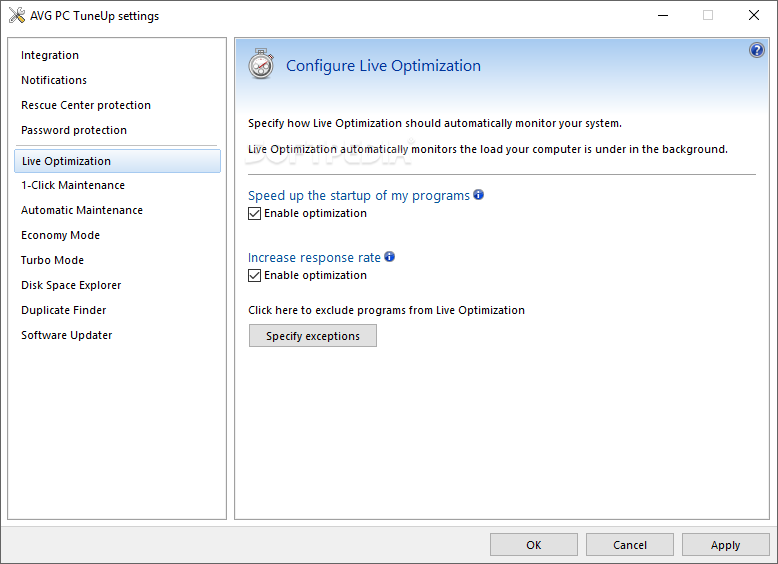
Plus: the new Tuning Status shows you at a glance how well you've optimized your PC with TuneUp Utilities. But with all these innovations, don't forget the TuneUp Utilities perennial favorites: 1-Click Maintenance and Automatic Maintenance for all-around maintenance of your PC, reliable hard drive defragmentation for additional performance, TuneUp Registry Cleaner for intensive Windows registry cleaning, Live Optimization to bring your active programs and games up to top speed, freeing up disk space by uncovering and disposing of data trash annd additional effective features that all make sure your PC remains at its best!
 

Features:
 
• Takes care of complete maintenance of your PC
• Provides peak performance for Windows®, programs, and games
• Includes more than 30 very clever tools


Installation Instructions:
 
• Install The Software.
• Register With Given Product Key.
• Done
OS : Win XP/2000/Vista/Win 7.